Appearance
Dashboard
Once you log in you will be able to access the dashboard.
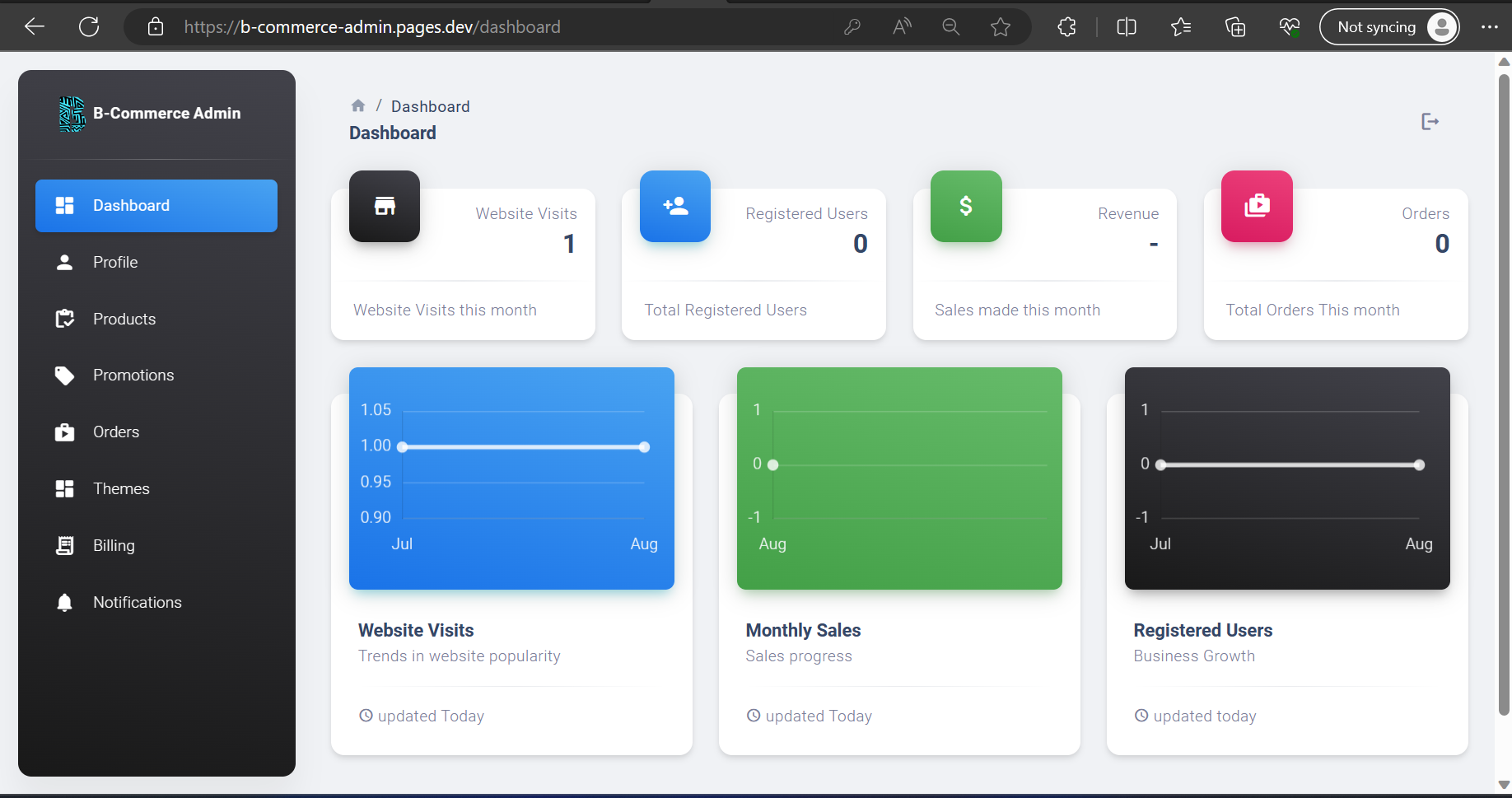
This is the statistics page. Here you will be able to track the performance of your store using the following metrics:
Statistics Cards
The statistics card display information from the current month
Statistics Card Description
- Website Visits: This represents the number of times a single device has accessed your website. This is recorded once every 12 hours for each access. This also represents the frequency and popularity of your website. If you’re running marketing campaigns, this can be used to see the effectiveness
- Registered Users: This represents the number of users that have an account with your store. Whenever users want to make an online purchase or request a quotation, they will need to have an account with your store.
- Revenue: This represents the total price of all goods sold in the current month
- Orders: This represents the total number of individual orders your store has had in the current month
Statistics Graphs
The graphs at the bottom indicate the progress over a period of 12 months depending on how long your store has been active.
Graphs Description
- Website Visits: Displays the trend in the number of website visits over a period of 12 months maximum
- Monthly Sales: Displays the trend in total sales over a period of 12 months maximum
- Registered Users: Displays the growth of your community by tracking number of registered users